


The Unexpected Heat: AC Failure or Software Override?
It is 4 p.m. on a sweltering late-summer afternoon, and you are trying to figure out why your smart thermostat keeps overriding your preferred temperature while the house grows increasingly warm. You set the dial to a comfortable 70 degrees earlier in the day, but a quick glance at the screen now shows the indoor temperature creeping up to 76 degrees. Here at Mountain View Heating, we frequently hear the panic in our customers' voices when this happens. You start wondering if the compressor has failed, if the refrigerant has leaked out, or if you are about to face a massive repair bill for your HVAC system just as the August heat reaches its peak and the busy back-to-school transition begins.
Before you panic and assume the worst, take a closer look at your device. In many cases that our technicians respond to, the cooling equipment is functioning perfectly fine. The reality is that the issue is frequently a well-intentioned software override rather than a mechanical failure. Modern climate control systems are designed to balance comfort with energy efficiency, and sometimes, those two goals conflict.
Particularly during August peak grid load times, these devices make automated decisions that prioritize reducing energy consumption over keeping your living room perfectly chilled. Understanding what causes these unexpected shifts is the first step in diagnosing the root cause. By identifying whether your system is truly broken or simply following a pre-programmed digital command, you can regain control of your indoor climate before calling our team for emergency repairs.
Diagnosing the Shift: Is Your System Broken or Just 'Smart'?
Sudden temperature shifts mimic the exact symptoms of a failing air conditioner. If warm air is blowing from your vents, or if the system simply refuses to turn on despite the house being uncomfortably warm, it is easy to assume the machinery is at fault. However, we always recommend that the first diagnostic step take place at the thermostat screen itself.
The problem: Your home is getting warmer, and the cooling system seems unresponsive or is running at a much lower capacity than expected.
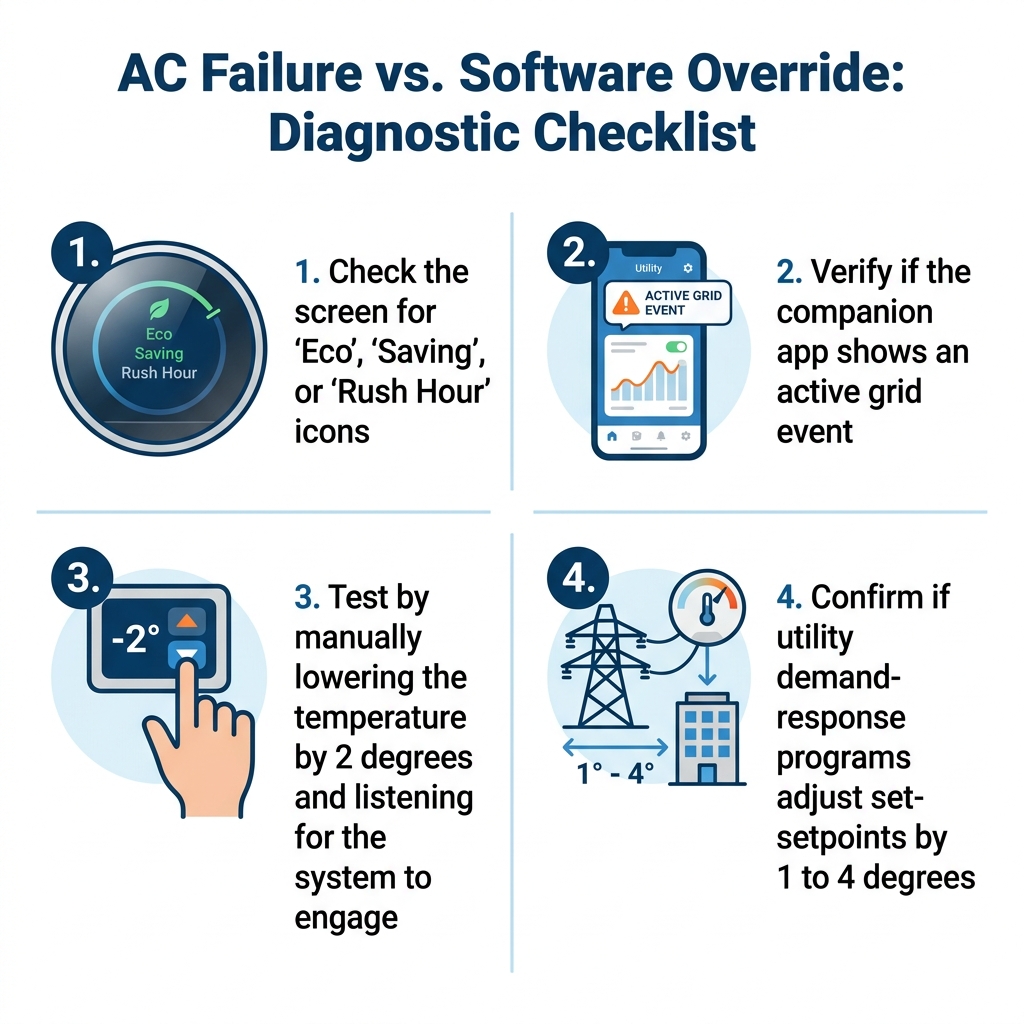
The cause: Wi-Fi enabled smart thermostats are equipped with various modes designed to save energy. Check your device's screen for specific icons. Do you see a small green leaf? Is there a message that says "Eco," "Saving," or "Rush Hour"? If any of these indicators are present, your system is actively restricting the cooling output based on a software directive, not a mechanical failure.
The solution: Manually clear the notification or adjust the temperature dial downward to see if the system engages. If you hear the familiar click of the thermostat and the rush of cold air follows shortly after, your equipment is fine.
During a stretch of high temperatures earlier this summer, our Mountain View Heating service teams found themselves working six days a week, often until 9 p.m., just to keep up with the demand for service calls and new heat pump installations. While many of those calls were genuine hardware failures requiring professional intervention, a significant portion of the frantic outreach traced back to easily reversible software settings. Homeowners assumed their systems were broken when, in fact, the device was just being "smart."
Of course, this does not mean you should ignore your equipment's health. Staying on top of routine HVAC maintenance ensures that when you do demand full cooling power, your system operates at peak capacity without struggling against dirty filters or worn components.

The Hidden Culprit: Utility Demand-Response Programs
If you have ruled out a simple eco-setting, the next most common reason we see preferred temperatures changing is a utility demand-response program. Local utility companies face massive challenges during extreme weather. When thousands of homes run their air conditioners simultaneously during late-summer heat waves, the electrical grid experiences severe stress, increasing the risk of rolling blackouts.
To combat this, utilities partner with thermostat manufacturers to implement demand-response programs, often branded under friendly names like "Rush Hour Rewards" or "Smart Energy Programs." Here is how they typically function:
• The Agreement: Homeowners typically opt into these programs when they first install their Wi-Fi enabled smart thermostats. In exchange for signing up, the utility company often provides an upfront enrollment incentive, a rebate on the device purchase, or annual credits on the energy bill.
• The Trigger: During August peak grid load times, the utility company sends a wireless signal to all enrolled devices in the region.
• The Adjustment: The thermostat automatically adjusts the setpoint by 1 to 4 degrees to reduce widespread energy consumption. For example, if you have your home set to 72 degrees, the utility might bump it up to 75 degrees for a few hours.
These events are completely normal and are designed to be temporary. They usually last between two to four hours during the hottest part of the late afternoon. While the utility company's goal is to prevent a neighborhood-wide blackout, the immediate result for you is a surprisingly warm living room.
• Temperature Control — Normal Operation: Stays exactly where you set it. — During a Demand-Response Event: Automatically raised by 1 to 4 degrees.
• Screen Display — Normal Operation: Standard temperature reading. — During a Demand-Response Event: Displays "Energy Event" or a specific icon.
• System Run Time — Normal Operation: Cycles frequently to maintain comfort. — During a Demand-Response Event: Cycles less often to reduce grid strain.
Eco-Settings and Built-In Energy Savers: Why Your Smart Thermostat Keeps Overriding Your Preferred Temperature
Beyond external utility programs, the device itself has internal programming designed to save you money. Modern thermostats are heavily marketed on their ability to reduce energy bills, and they achieve these savings by actively managing your air conditioning performance when they believe you do not need it.
Our installers often remind homeowners that default eco-settings prioritize energy efficiency over strict temperature adherence. When you first install the device, it often defaults to a mode that allows the temperature to drift slightly outside of your preferred range to prevent the compressor from turning on and off too frequently. This is great for your monthly bill, but it can be frustrating if you are sensitive to minor temperature fluctuations.
Another major factor is geofencing and "Away" modes. Wi-Fi enabled smart thermostats use the location services on your smartphone to determine if you are home. If the system detects that your phone has left a predetermined radius around your house, it automatically shifts into an energy-saving mode, raising the temperature to avoid cooling an empty house.
However, we see these features mistakenly trigger for several reasons:
• Location tracking issues: If your phone's background app refresh is turned off, the thermostat may not realize you have returned home.
• Multiple occupants: If one person leaves the house with the primary connected phone, the system might switch to "Away" mode, leaving the rest of the family sweltering in the living room.
• Motion sensor limitations: Some devices rely on physical motion sensors. If you are sleeping, reading quietly, or working in a home office far from the hallway where the thermostat is mounted, it might assume the house is empty and adjust the temperature accordingly.
Left unmanaged, these default settings can significantly impact your overall comfort. Taking the time to adjust the geofencing radius or turn off motion-based "Away" triggers can quickly solve the mystery of the shifting temperatures.
When Learning Algorithms Guess Wrong
The defining feature of many modern climate control systems is their ability to "learn" your habits. Instead of requiring you to manually program a seven-day schedule, these devices spend their first few weeks observing your manual adjustments. They track when you wake up, when you leave for work, and when you prefer the house to be cooler in the evening. From this data, they attempt to build a personalized schedule automatically.
In theory, this is incredibly convenient. In practice, our team frequently observes that learning algorithms can become easily confused. If you have a highly irregular schedule, work shift hours that change weekly, or recently took a vacation, the algorithm will struggle to establish a consistent pattern. Sudden weather changes can also throw the system off balance. If you manually cranked the AC down during a brief, unseasonal heat wave, the thermostat might incorporate that extreme setting into its permanent schedule, or conversely, it might refuse to cool the house sufficiently because it learned you prefer higher temperatures based on data from a cooler month.
If you find yourself constantly fighting the dial, it is highly likely that an auto-schedule is actively overriding your manual adjustments. The device thinks it is doing you a favor by reverting to the schedule it created, completely unaware that its assumptions are incorrect. For a deeper dive into how these specific functions operate, understanding your thermostat's modes and settings is critical to getting the most out of your investment.
To fix this, you generally need to dive into the companion app on your smartphone, review the schedule the device has built, and clear out the incorrect data points. Sometimes, the easiest solution is to turn the learning feature off entirely and rely on a traditional, manual schedule.
Navigating High Desert Temperature Swings
In our years of installing and servicing HVAC systems in Bend, Oregon, our team has seen firsthand how the High Desert climate presents unique challenges for automated climate control systems. Our environment is characterized by rapid, extreme temperature shifts. It is not uncommon to experience intense, blistering heat in the late afternoon, followed by rapidly cooling temperatures as soon as the sun goes down. These drastic diurnal swings create a chaotic environment for learning algorithms.
When the outdoor temperature fluctuates by 30 or 40 degrees within a single 24-hour period, the thermal mass of your home reacts slowly. The house continues to hold onto the intense afternoon heat long into the evening. However, a smart thermostat monitoring the dropping outdoor temperature might assume that the cooling demand is over. It automatically shifts into an eco-mode, falsely believing the cool night air will handle the rest. The result is a stuffy, uncomfortably warm house right when you are trying to go to sleep.
Furthermore, these extreme afternoon temperature spikes are exactly what trigger August peak grid load times. Just as your home is absorbing the maximum amount of solar radiation, the local utility company initiates a demand-response event, overriding your settings and raising the indoor temperature to protect the grid.
To navigate this specific climate challenge, we advise homeowners to establish firm manual baselines. Relying entirely on automated algorithms in a high desert environment often leads to the system underperforming during the critical transition period between the hot afternoon and the cool night. By setting strict parameters, you prevent the system from overcompensating and shutting down the cooling cycle prematurely.
How to Regain Control Over Your Home's Climate
If you are tired of battling your thermostat for control over your own living room, you have options. You do not have to accept unexpected temperature shifts as a permanent reality. With a few adjustments in your companion app, you can permanently disable disruptive features and restore consistent comfort.
Working with our local professionals at Mountain View Heating means you benefit from our team's daily, on-the-ground expertise in configuring modern HVAC systems to balance high desert comfort with optimal energy use. Proper configuration ensures you maintain heating efficiency in the winter and reliable cooling in the summer without sacrificing your personal preferences.
Adjusting Eco and Learning Preferences
The quickest way to stop the device from making its own decisions is to turn off its automated features. Follow these steps to lock in your preferences:
1. Open the companion app: Navigate to the primary settings menu on your smartphone app, as many of these advanced features cannot be disabled directly from the wall unit.
2. Disable auto-scheduling: Look for the "Auto-Schedule" or "Learning" toggle and switch it to the off position. This forces the device to operate strictly based on the manual schedule you input.
3. Adjust eco-temperatures: Find the "Eco" or "Away" settings. You can either turn location-based geofencing off entirely, or adjust the default "Away" temperature to a more tolerable level so the house doesn't get excessively hot when you run to the grocery store.
4. Clear the history: If the device has learned bad habits, locate the option to "Reset Schedule" or "Clear Learning History" to start fresh with a clean slate.
Managing Utility Enrollments
If your temperature overrides are caused by grid-saving events, you have the right to opt out. While these programs are beneficial for the community, they are strictly voluntary.
1. Temporary overrides: During an active event, you can usually bypass the utility's restriction by simply turning the dial down on the wall unit. A prompt will ask if you want to end the event early, and confirming will restore your preferred temperature.
2. Check your enrollments: Open the energy, rebates, or rewards section of your thermostat app to see if you are actively enrolled in a program like "Rush Hour Rewards."
3. Unenroll completely: If the events are too disruptive, follow the prompts within the app to unenroll. Alternatively, you may need to log into your local utility provider's online portal to officially remove your device from the demand-response program.
Restoring Consistent Comfort to Your Home
Sudden, unexpected temperature changes are overwhelmingly a matter of software settings rather than a catastrophic breakdown of your cooling equipment. Whether the culprit is a well-intentioned eco-mode, a confused learning algorithm, or an active utility demand-response event during August peak grid load times, the power to fix it rests in your hands.
You always have the ability to prioritize your personal comfort over automated grid-saving events. By taking a few minutes to dive into your app settings, clear out old learning data, and manage your utility enrollments, you can ensure your preferred temperature stays exactly where you put it. If you continue to experience cooling issues after adjusting these settings, or if you want expert guidance on optimizing your home's climate control, reaching out to our professional team can help you verify your system's performance and restore consistent comfort to your home.
Frequently Asked Questions
Why does my smart thermostat change temperature by itself?
Your device changes the temperature automatically because of active eco-settings, learning algorithms, or utility demand-response programs. These features are designed to save energy by raising the temperature when they detect you are away or when the electrical grid is under heavy stress. You can usually disable these automated adjustments within the device's companion app.
Can the power company control my thermostat?
Yes, but only if you have explicitly opted into a demand-response program or accepted an energy rebate that included enrollment terms. During times of high grid stress, the utility company can send a signal to your Wi-Fi connected device to temporarily adjust the setpoint by a few degrees. This helps prevent regional blackouts by reducing widespread energy consumption.
How do I opt out of utility thermostat control?
You can usually opt out of a single event simply by manually adjusting the temperature dial on your wall unit during the event. To permanently unenroll, you will need to navigate to the "Energy" or "Rewards" section of your thermostat's companion app and disable the feature, or log into your utility provider's online portal to revoke access.
Why does my thermostat keep going to Eco mode?
The system switches to Eco mode when its geofencing feature or motion sensors determine that the house is empty. If your phone's location services are disabled, or if the thermostat is located in a hallway with little foot traffic, it may falsely assume you have left the house and trigger the energy-saving mode to reduce cooling costs.
Does a software override mean my air conditioning is failing?
No, a software override is a deliberate digital command to reduce energy use and does not indicate a mechanical failure. If you clear the eco-setting or opt out of the grid event and the system immediately begins blowing cold air, your air conditioning equipment is functioning properly. If the system still fails to cool after adjusting the settings, a mechanical issue may be present.